【Cs】Send Email (寄信)
文前言
紀錄一些寄信寫法
主文
MailKit
官方文件:
- Introduction
- Creating messages
- (裡面也有附上如何附檔的寫法)
那麼如果檔案不是實體路徑而是 Stream 的話
using (Stream contentStream
    = (await request.GetResponseAsync()).GetResponseStream())
{
    MemoryStream memoryStream = new MemoryStream();
    await contentStream.CopyToAsync(memoryStream);
    memoryStream.Position = 0;

    // create an image attachment for the file located at path
    MimePart attachment = new MimePart("application", "pdf")
    {
        Content = new MimeContent(memoryStream, ContentEncoding.Default),
        ContentDisposition
            = new ContentDisposition(ContentDisposition.Attachment),
        ContentTransferEncoding = ContentEncoding.Base64,
        FileName = ...
    };

    // Note: it is important that the text/html part is added second, because it is the
    // most expressive version and (probably) the most faithful to the sender's WYSIWYG
    // editor.
    MultipartAlternative alternative = new MultipartAlternative();
    alternative.Add(body);

    // now create the multipart/mixed container to hold the multipart/alternative
    // and the image attachment
    Multipart multipart = new Multipart("mixed")
    {
        alternative,
        attachment
    };

    // now set the multipart/mixed as the message body
    message.Body = multipart;
}
這裡的寫法有參照官方文件 + Claude
另外我要傳的檔案是 pdf,所以 new MimePart() 接取的參數有所調整。
TextPart() 參數
下圖是來自官方程式碼:
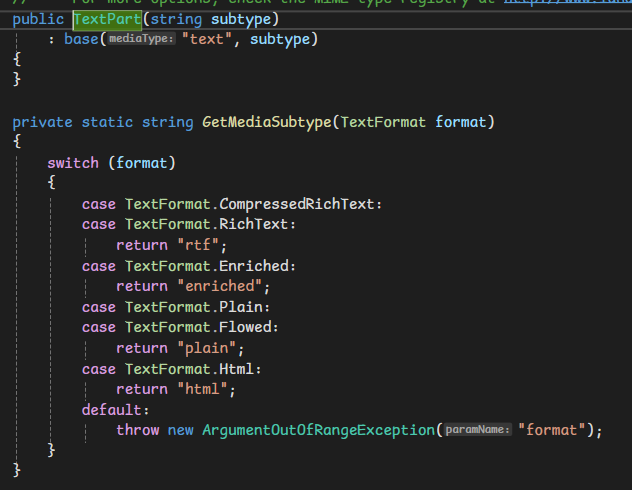
body 常用的就是 plain、html
SMTP
官方文件:System.Net.Mail 命名空間 | Microsoft Learn
網路上文件很多,都能找到,就不放了。
UPDATE LOG
115. 06/17 開新篇